

Post Categories: What do you need help with?
Starting Your Studio
Keep Your Studio Running
Making Your Studio Thrive
Easy Valentine’s Day Music Lesson Done for You: Games, Treats & Takeaways

A Valentine’s Day Music Lesson Your Students Will Love
Valentine’s Day is the perfect excuse to sprinkle a little extra joy, color, and creativity into your music studio. This is something you can use during the entire week so everyone in the studio gets to have the fun “themed” lesson. Whether you teach piano, voice, strings, or general music, this themed lesson plan gives you a full class of festive fun—complete with games, treats, and a special skill students can proudly take home. Adjust it to fit your lesson length.
Below is a ready-to-use Valentine’s Day lesson you can plug straight into your studio schedule.
Warm‑Up: “Heartbeats & Rhythms”
Start the lesson with a quick rhythm warm‑up using the idea of a heartbeat. Have students tap quarter note, quarter note, 8th note quarter patterns (like ta–ta–ti‑ti‑ta) patterns on their lap, then create their own “heartbeat rhythm” to share. This sets the tone for a playful, musical session.
Three Valentine’s Day Music Game Ideas
1. Cupid’s Rhythm Toss
Place rhythm cards on the floor in a heart shape.
Students toss a small beanbag onto a card.
Whatever rhythm it lands on, they must clap, play, or sing.
Bonus: Let them earn a small sticker for each correct rhythm.
This game gets them moving and reinforces rhythm reading in a low‑pressure way.
2. Musical Matchmaker
Prepare pairs of cards: one with a musical term, one with its definition.
Scatter them face‑down like a memory game.
Students flip two at a time, trying to find the correct match.
You can tailor the difficulty by choosing terms appropriate for each student’s level—dynamics, tempo markings, intervals, or even note names.
3. Valentine’s Melody Hunt
Hide heart‑shaped cards around the room.
Each card contains a short melodic pattern or interval.
When students find one, they must play or sing it before collecting it.
This adds excitement and encourages quick recognition of melodic patterns.
Sweet Treat Ideas for the Lesson
Keep it simple, allergy‑friendly, and music‑themed:
Heart‑shaped fruit snacks
Pink or red wrapped chocolates
Mini Valentine pencils or erasers
A “You Make My Heart Sing!” sticker
A tiny heart‑shaped cookie (individually wrapped)
Treats don’t have to be sugary—small themed trinkets feel just as special.
Special Skill of the Day: “The Love Chord”
End the lesson with a musical takeaway they’ll remember.
Teach students a new chord or interval and call it the Love Chord for the day. Depending on their level, this could be:
A simple C major chord
A I–V–I progression
A major 6th interval (because it sounds warm and sweet)
A short two‑measure Valentine melody they can play for their family
Have them perform it once at the end of the lesson so they leave feeling accomplished and celebrated.
Final Thoughts
Valentine’s Day is a wonderful opportunity to build connection, spark creativity, and make music lessons feel magical. With a few themed games, a small treat, and a special musical takeaway, your students will walk out smiling—and eager for next week.
Happy Teaching!
Becky
How to Switch to Online Music Lessons Fast: 4 Steps for Weather Emergencies
How to Switch to Online Music Lessons in a Pinch
This week with the SNOWpocalypse, I had to switch to online lessons. I’ve got a massive hill in front of my house and students coming here, or me leaving to drive to my lessons wasn’t an option. Bad weather doesn’t have to derail your teaching schedule—or your income. One of the biggest gifts you can give yourself as a studio owner is a simple, reliable plan for moving lessons online at a moment’s notice. When snow, ice, or unexpected emergencies pop up, having a system in place keeps your studio running smoothly and your students progressing without interruption.
Below is a streamlined, teacher‑friendly guide you can implement today so you’re never scrambling again.
Step 1: Choose Your Online Platform Before You Need It
Don’t wait until the storm hits to decide how you’ll connect.
Pick one primary platform and one backup option:
Primary: FaceTime (my preferred), Zoom, or Google Meet
Backup: A second app your students already have access to
Make sure:
Your device is updated and charged
Your camera and microphone work
You know how to share your screen or audio if needed
🎶 Tip: Add your meeting link to your studio policies or welcome packet so families always know where to go.
Step 2: Create a Quick-Send Communication Template
When weather changes fast, you don’t want to spend 30 minutes crafting a message.
Prepare a short script you can copy, paste, and send to all families. Something like:
“Due to weather conditions, all lessons today will be held online at your regular time. We’ll meet on FaceTime/Zoom. If you lose power or internet, please let me know as soon as possible.”
Save this in your notes app, email drafts, or studio management software so it’s always ready.
Step 3: Keep an Online-Friendly Lesson Plan on Standby
Online lessons run best when you have a structure that works specifically for the virtual format. It’s best to have a copy of all the method books your students use on hand for this reason (or if a student ever forgets their music, you can continue as planned) Just know, you won’t be able to get through the lesson at the same speed as normal as internet connection issues happen, or there’s a delay on the line. Teaching online has always been just a little bit slower in progress. But it can be done. But you can also have the following to help make the lesson more fun and run smoothly.
Have a small collection of “online-ready” activities you can pull out instantly:
Digital flashcards
Rhythm echo games
Play-along tracks
Sight-reading apps
Short technique challenges
A few printable worksheets you can email if needed
This ensures your lesson stays engaging—even if the switch was last-minute.
Step 4: Prepare for Power or Internet Issues
Weather can be unpredictable, so build flexibility into your plan.
Have a policy in place for:
What happens if you lose power
What happens if they lose power
Whether lessons are rescheduled, refunded, or skipped
How students should notify you if they can’t connect
You can also keep a portable charger nearby so your phone stays powered for FaceTime lessons or communication.
Final Thoughts
A smooth transition to online lessons isn’t about perfection—it’s about preparation. With a clear plan, a ready-to-send message, and a few online-friendly activities in your back pocket, you can turn a stressful weather day into a seamless teaching day.
Happy Teaching!
Becky
Done For You - Spring Practice Challenge Kit
🌸 Introducing the Spring 2026 Practice to Performance Challenge: A Done For You Path to Confident Spring Recital Performances
Spring recital season is right around the corner, and if you’re anything like most music teachers, you’re already thinking about how to keep your students practicing consistently in the weeks leading up to it. That’s exactly why I created the Practice to Performance – Spring 2026 Teacher’s Kit — a complete, zero‑prep practice challenge designed to guide your students from early‑spring warm‑ups to confident recital‑day performances.
This 15‑week challenge gives you everything you need to support steady, purposeful practice without adding anything extra to your plate. Whether you run it with your entire studio or offer it to individual students, you’ll have a clear, structured system that keeps everyone moving forward.
Start Date for the Kit is February 2 and goes until May 15
🎶 What’s Inside the Teacher’s Kit
The Spring 2026 Practice Challenge includes:
• 15 weekly themed pages with a Technical Challenge + Creative Challenge
• Student practice charts for tracking daily progress
• Coloring pages to keep younger students motivated
• A studio‑wide sticker chart to build community and excitement
• Teacher instructions to help you roll it out with ease
• A video walkthrough so you can see exactly how to use the kit in your studio
Everything is organized, ready to print, and designed to help your students build habits that last.
🌱 Why This Challenge Works
The structure of the challenge follows a natural arc from February through May, helping students:
• Start strong with simple, engaging weekly goals
• Build consistency through daily practice tracking
• Sustain motivation with creative activities and visual progress
• Thrive on recital day with pieces that feel polished and confident
Teachers love that it’s completely plug‑and‑play. Students love that it’s fun, colorful, and easy to follow. And studios love the sense of momentum it creates.
🎉 Now Available for Spring 2026
You can now access the full Practice to Performance – start preparing your studio for a smooth, successful recital season. If you’ve been looking for a way to keep students practicing with purpose — without adding hours of planning to your week — this kit was made for you.
Let’s make this spring your most confident, consistent, and joyful recital season yet.
The Great Reset: Transitioning Your Music Studio from 2025 to 2026
As we wrap up another year of music-making, performances, and student growth, it’s time for one of my favorite annual traditions in studio management: the Great Reset. This is the moment when we shift our studios from one year to the next with clarity, organization, and a fresh start. It’s a simple ritual, but it sets the tone for a smooth and successful year ahead.
Below, I’m sharing the exact steps I take inside my own studio—and the same workflow I teach in the Keep Your Studio Running section of my online course, Successful Music Studio Strategies. If you love structure, clean systems, and starting the year with everything in its place, this reset will feel incredibly satisfying.
Updating Your Templates for 2026
Every December, I begin by updating my core studio templates—the ones I rely on all year long.
Lesson Summary Templates
These are the backbone of my student records. I update the year from 2025 to 2026 in the main template, not the individual student files. That way, once the master version is refreshed, I can simply copy and paste it into each student’s account folder. It keeps everything consistent and saves a tremendous amount of time.
Payment Receipt Templates
Same process here: update the year, double-check your studio info, and make sure everything reflects the new teaching cycle. These templates are used constantly, so having them polished and ready makes a big difference in your day-to-day workflow.
Once the main templates are updated, I pull up the 2025 versions and transfer any relevant information into the new 2026 files. It’s quick, clean, and ensures nothing gets lost in the transition.
Gathering Your 2025 Receipts
The Great Reset is also the perfect moment to collect every receipt from the past year—digital and physical. Whether it’s sheet music, mileage, software subscriptions, or studio supplies, this is the time to gather it all into one place.
If you’ve been keeping up with this monthly, great. If not, no worries—this is your chance to get everything organized before tax season sneaks up on you.
Updating Your Total Money Earned Sheet
Your Total Money Earned sheet is one of the most important documents in your studio. Before closing out the year, make sure:
All 2025 income is entered
Any late December payments are recorded
Your yearly total is accurate
Your multi-year tracking sheet reflects the final number
This gives you a clear picture of your studio’s growth, helps you plan confidently for the year ahead, and gets you ready for the upcoming tax season.
A Fresh Start for a New Year
Once these pieces are in place, your studio is officially reset and ready for 2026. It’s a small investment of time that pays off all year long—less stress, fewer surprises, and a beautifully organized foundation for your teaching, creativity, and business goals.
If you want a deeper walkthrough of each step, all of these documents and processes are included in the Keep Your Studio Running module of Successful Music Studio Strategies. It’s designed to help you build a studio that’s not just functional, but thriving for years to come.
Here’s to a strong, streamlined, and inspired 2026.
Happy Teaching!
Becky
FREE 2025 Pre-Made Holiday Themed Canva Recital Program Templates
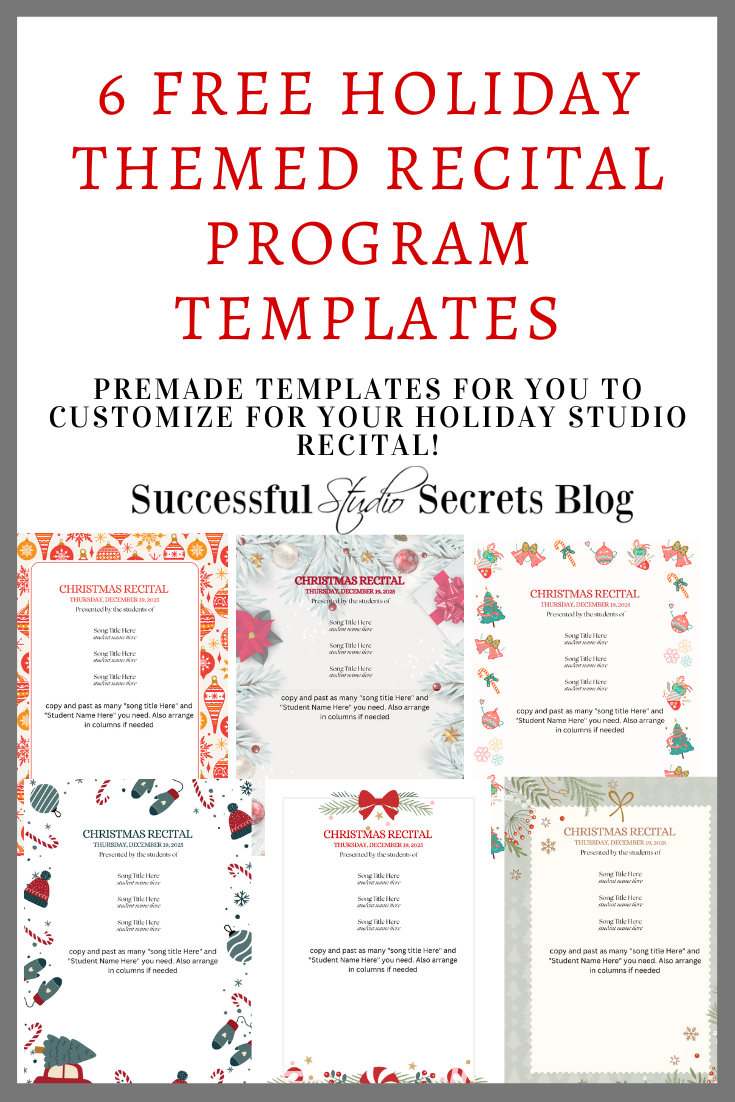
Need help with a quick and easy recital program? I made 6 different Holiday Themed Recital Program Templates this year, you can use them using Canva.com. (not paid or advertising, just an actual service I use.)
You can create a FREE ACCOUNT to get access, and be sure to save the templates to your account before you make changes so everyone can access them as they are now.
Happy Teaching!
Becky


I’m Becky and Welcome To Successful Music Studio Strategies where I help you create your own Successful Private Music Studio business through simple strategies I’ve learned and used in my own successful private music studio! Want to learn more about my online courses to help you start, build and create a successful and THRIVING music studio? Click here!
Bookkeeping Powerhouse Mini course and Studio Policy Templates NOW AVAILABLE!
